Identity Graph Linking Rules: What They Are, How They Work, and When to Use Them
By Stephen Tettey | Sr. Director - AEP Architecture, Adobe Experience Platform and Adobe Journey Optimizer
Part 1 of 3 in the Identity Graph Linking Rules series
If you have spent any meaningful time inside Adobe Experience Platform, you have likely encountered a moment where two customers who should be completely separate people are sharing a single profile. You follow the identity graph, trace the links, and find one connecting thread pulling unrelated people into the same unified record. That is profile collapse. And for a long time, the only real answer was to design more carefully upstream and hope for the best.
That changed. Identity Graph Linking Rules are now generally available in AEP, and while the core mechanic is relatively simple to explain, the decisions around configuring them well are not. This post is the foundation. It covers what the feature does, how it works under the hood, and most importantly, a framework for deciding when you actually need it and when you do not.
The Problem Is Bigger Than a Shared Device
The standard profile collapse example involves two people sharing a device. It is a clean illustration of the mechanics, but it understates the scope of the problem in production environments.
Profile collapse causes are better grouped into three distinct categories, because each one points to a different configuration response.
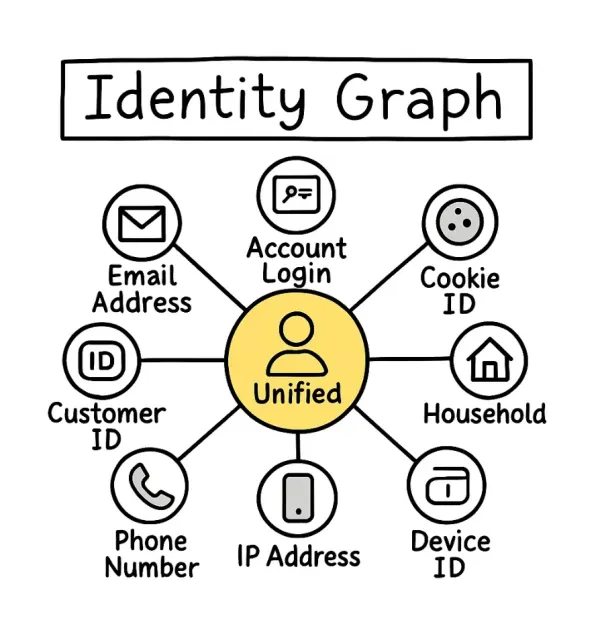
Shared devices and shared sessions. A household laptop, a call center workstation, a hotel kiosk, a shared tablet at a retail point of sale. Multiple authenticated users generate a chain of identity links through the same ECID. This is the scenario most documentation covers.
Dirty or invalid identity values. Phone numbers submitted as "0000000000." Email addresses entered as "noemail@noemail.com." IDFA values that are clearly placeholder strings. These values are not mistakes in the graph logic. They are mistakes in the upstream data that the graph faithfully executes on. When thousands of profiles all carry the same invalid phone number and that phone number is treated as an identity, AEP links all of them. The result is a graph with hundreds or thousands of CRMID nodes hanging off a single erroneous identifier.
Architectural namespace errors. Multiple business units, brands, or systems sharing the same identity namespace when their values are not actually comparable. A loyalty number that is unique within Brand A but has no relationship to a loyalty number with the same value in Brand B. When both are ingested under the same namespace, AEP treats them as the same person. This is a design error, not a data quality error, and it requires an architectural fix, not just data cleaning.
Identity Graph Linking Rules address all three categories. But the configuration approach for each is different, and conflating them leads to misconfiguration.
How the Feature Works
The feature has two core settings that work together but serve different purposes.
Unique Namespace. You designate a namespace as unique. The Identity Optimization Algorithm then enforces that no single identity graph may contain more than one identity of that namespace type. If a second identity of that namespace arrives and would create a violation, the algorithm removes the oldest link. The identity is not deleted from the system. It simply becomes the anchor of its own separate graph rather than a node in someone else's.
Namespace Priority. You assign a ranked priority order across all your namespaces. Priority serves two functions. First, when the optimization algorithm must decide which link to break during a collision, it uses priority to determine which identity is the authoritative one. Second, and this is the part that practitioners most commonly overlook, namespace priority determines the primary identity on experience event fragments stored in Real-Time Customer Profile.
That second function matters enormously in practice. The primary identity on an experience event fragment determines where that fragment is stored and how it is retrieved during profile reads. If you configure priority carelessly, your event data may be indexed against a low-confidence device identifier rather than your authoritative person identifier. Segments built on behavioral data will then reflect whoever happened to touch that device, not the authenticated customer you believe you are targeting.
These two settings must be designed together. Unique namespace prevents collapse. Namespace priority governs which identities are authoritative when the algorithm has to make a call. They are related but not redundant, and each has consequences in different parts of the system.
The ECID Trade-Off and Its Downstream Implications
When you enable linking rules and configure a person identifier as unique, the ECID anchors itself to the most recently authenticated user on any given device. Anonymous pre-login events are attributed to whoever last logged in. This is an honest outcome: you genuinely do not know who was browsing before authentication occurred.
What is less often discussed is the downstream implication for real-time personalization at the edge.
When AEP serves a real-time decision through Adobe Journey Optimizer or the Edge Network, it reads the profile associated with the current ECID. If that ECID is currently tied to Bob's profile because Bob was the last person to authenticate, but Alice is now browsing anonymously on the same device, Alice receives Bob's personalization. Not because the graph collapsed. Because the ECID was correctly anchored to Bob and Alice has not yet authenticated.
This is not a bug introduced by linking rules. It is a pre-existing condition of cookie-based identity on shared devices that linking rules surface more explicitly. But it means that enabling linking rules can produce a new class of visible personalization errors that did not appear before, because the pre-linking-rules collapse masked the problem by blending Alice and Bob into a single profile rather than surfacing the attribution ambiguity.
The practical mitigation is to create a merge policy with ID stitching set to "None" and configure it as the Active-On-Edge Merge Policy. Real-time edge decisions then operate on unstitched data, meaning anonymous users receive no personalized treatment until they authenticate. For organizations in financial services, healthcare-adjacent, or loyalty contexts where incorrect personalization carries a real trust cost, this is the right default. For others, the loss of anonymous personalization is an unacceptable trade-off. Know which camp you are in before you configure.
What Practitioners Get Wrong About Namespace Priority
This deserves its own section because misconfiguration here is common and the consequences are serious.
The most frequent mistake is treating namespace priority as purely a tiebreaker for collapse resolution, when in fact it also governs how your profile fragments are indexed. Practitioners configure their CRM ID as the highest priority namespace because they understand it should win during a collision. But they do not think through the full chain of consequences: every experience event fragment that arrives in AEP will now be stored against the CRM ID as its primary identity. If a CRM ID is not present on that event, the fragment falls to the next priority namespace, and so on down the stack.
If your web analytics events frequently arrive without a CRM ID because the user has not authenticated, those events will be indexed against your second-priority namespace. If that namespace is ECID, your event data is indexed against a cookie, which is correct behavior. But if your second-priority namespace is a partner ID or a channel-specific identifier that is not reliably unique, your event fragments will be indexed inconsistently.
The governing principle: your highest-priority namespace should be the identifier that is most widely present, most persistent, and most reliably unique across your data. In most enterprise implementations, that is the CRM ID. If your CRM ID is not present on the majority of your event data, you need to either improve its coverage upstream or reconsider which namespace holds the top priority position.
The consequence of getting this wrong is not immediately obvious. Segments will appear to function. Profiles will appear complete. The errors surface gradually as you notice that behavioral data is not stitching to the right profiles, or that journey triggers are firing on device-level events rather than person-level events.
A Decision Framework: When to Use Linking Rules and When Not To
You likely need linking rules if any of the following are true:
Your implementation involves shared devices at meaningful scale. Call centers, retail point-of-sale systems, hospitality properties, family accounts in a consumer loyalty program. If more than a small fraction of your ECID traffic comes from environments where multiple people authenticate on the same device, you have a structural collapse risk that linking rules are designed to solve.
Your identity data includes values that are not inherently unique. Email addresses, phone numbers, or any identifier that can be legitimately shared between people. Email addresses are shared more often than most implementations account for: spouses using the same address, parents creating children's accounts under their own email, grandchildren managing elderly relatives' accounts. Phone numbers get recycled by carriers. Any identifier you do not fully control carries shared-value risk.
You have upstream data quality issues that cannot be fully remediated before ingestion. Placeholder values, recycled identifiers, or erroneous submissions that slip through validation. Linking rules with a unique namespace on your primary person identifier prevent these bad values from acting as identity bridges between unrelated profiles.
You are operating in a multi-brand or multi-business-unit environment where brand-specific identifiers share a namespace. This is the most architecturally complex case. Part 2 of this series covers it in depth through a real enterprise implementation.
You may not need linking rules if all of the following are true:
Your primary person identifier is inherently unique and tightly controlled. A CRM ID generated from a system where no two customers share a value. A unique account number. A hashed composite key that is deterministically generated per person. If that identifier is the only person namespace you use and it is reliably clean, native AEP identity stitching combined with a well-designed merge policy will handle most scenarios correctly without additional linking rule configuration.
Your device traffic is predominantly single-user. Direct-to-consumer digital properties where shared device scenarios are genuinely edge cases rather than structural patterns.
Identity resolution is already handled authoritatively upstream. If your organization operates a Master Data Management system or a Customer Identity and Access Management platform that resolves identity before data enters AEP, and AEP receives clean pre-resolved identities, adding linking rules inside AEP may introduce redundant or conflicting logic. The right place to enforce identity uniqueness is where the authoritative resolution decision is made.
One important clarification on scope: linking rules are a contributing factor in a comprehensive identity resolution strategy, not a replacement for one. They strengthen the case for resolving certain online and offline identities within the CDP. But they do not make AEP an identity provider or an MDM. That boundary matters and should be a conscious architectural decision, not an assumption. Part 3 of this series addresses that boundary directly.
Before You Enable Anything in Production
Use the Graph Simulation tool. Adobe provides it within the Identity Service UI at https://experienceleague.adobe.com/en/docs/experience-platform/identity/features/identity-graph-linking-rules/graph-simulation. Load your actual namespace scenarios, including your worst-case shared device chains and your known bad identity values. Watch the graph behavior change as you adjust settings. It is one of the more underused tools in the AEP interface and one of the most valuable for this specific problem.
There is no rollback. This is not a caveat buried in a footnote. Once you enable identity settings in production, collapsed graphs begin to un-collapse according to your configured rules, and there is no mechanism to restore the previous state without re-ingesting your data. If you have existing production data with extensive collapse, plan a reconciliation period where your analytics and activation teams understand that segment counts and profile totals will change. The change reflects a more accurate state, but your stakeholders need to be prepared for it.
A practical pre-enablement checklist:
Classify every namespace currently in use as a person identifier, device identifier, or partner identifier. Do not move forward until this classification is complete and agreed upon across your implementation team.
Identify every scenario in your data where a namespace could carry a shared or invalid value. Document them explicitly. This document becomes your simulation test plan.
Run at least four simulation scenarios in the Graph Simulation tool: a clean single-person authenticated flow, a shared device collision, a bad identity value bridge, and whatever your most complex real-world case looks like.
Align with your analytics and activation teams on expected segment count changes before enablement. A sudden drop in a key segment after go-live is alarming if nobody expected it. It is informative if the team was prepared.
Enable in a development or staging sandbox first. Compare segment sizes and profile counts before and after across your most critical audiences.
Define a monitoring window in production. At minimum two weeks of observation before treating the implementation as stable.
What Comes Next
This post covers the mechanics, the decision framework, and the configuration principles for the scenarios most practitioners will encounter.
Part 2 goes further. It covers a real enterprise implementation involving four brands running on a shared AEP sandbox, twelve identity namespaces, a hard guardrail in AEP's linking rules configuration that most practitioners have never encountered, and the process of working with Adobe's engineering team to earn an exception to that guardrail based on simulation evidence.
Part 3, "Stop Resolving Identity in the Wrong Place," steps back from configuration details and addresses the broader question: where does identity resolution actually belong in your architecture, and how do you make that decision deliberately rather than by default?
References
- Adobe Experience League: Identity Graph Linking Rules Overview — https://experienceleague.adobe.com/en/docs/experience-platform/identity/features/identity-graph-linking-rules/overview
- Adobe Experience League: Namespace Priority — https://experienceleague.adobe.com/en/docs/experience-platform/identity/features/identity-graph-linking-rules/namespace-priority
- Adobe Experience League: Graph Simulation UI — https://experienceleague.adobe.com/en/docs/experience-platform/identity/features/identity-graph-linking-rules/graph-simulation
- Adobe Experience League: Identity Optimization Algorithm — https://experienceleague.adobe.com/en/docs/experience-platform/identity/features/identity-graph-linking-rules/identity-optimization-algorithm
Stephen Tettey is an Adobe Certified Multi-Solutions Architect with five years of hands-on experience implementing AEP, Real-Time CDP, Adobe Journey Optimizer, Adobe Analytics, and Customer Journey Analytics across financial services, travel, loyalty, and cybersecurity industries.